


Showing posts with label hostgator. Show all posts
Showing posts with label hostgator. Show all posts
Monday, November 22, 2010
If You Auto Blog You Need A VPS Host
The discount code for the Auto Blog Blueprint 2.0 has been quite popular and a few that bought have emailed me questions. As Michael Johnson suggest, you will not want to set these up on shared host like Hostgator. Now there is nothing wrong with Hostgator mind you, it is just when you get a few of these going, they will set off a red flag and they might suspend your account or shut your sites down until you stop the auto blogging. You might get away with one, two or even three, but they will catch you. I use 6 different hosting companies and the best choice for auto blogs is Servint Essential VPS. They are great with phone call support and getting you set up as well. Make sure whatever hosting you use, make sure it is a fast VPS that allows auto blogs. You have been warned.
Tuesday, March 17, 2009
Hostgator Coupon Code St. Patricks Day Special
Hostgator is running a St. Patricks Special from now until April 1st. If you follow this blog, you will know that I am a huge fan of them. They are one of my many hosting companies that I use and they are especially very user friendly for newbies. Just enter in coupon code: LUCKY and receive 20% off of your initial order. Get your spring off to a great start with Hostgator. Host Gator provides Shared, Reseller and Dedicated web hosting packages. Their hosting platform is designed for both beginners and experienced professionals. All of their shared plans include a 99.9% uptime guarantee, 24/7 support and a 45-day money back guarantee.
Thursday, January 15, 2009
Comma Fix For BANS Pages Not Saving
If you are hosted with Hostgator, you may have noticed that pages with commas in them will not save properly after editing. This is due mostly to changes I believe Hostgator has made to the magic_quotes_gpc setting. The fix is quite simple as pointed out by BANS forum member ReneeT. To fix and solve this...
Go to your Hostgator Cpanel and under "Software / Services", click on "php.ini quick config", find "magic_quotes_gpc" and set it to "On" without the quotations.
As always, make sure to test it out and notate this change you made somewhere you can easily locate it.
Go to your Hostgator Cpanel and under "Software / Services", click on "php.ini quick config", find "magic_quotes_gpc" and set it to "On" without the quotations.
As always, make sure to test it out and notate this change you made somewhere you can easily locate it.
Wednesday, December 17, 2008
Open Apology To Hostgator
Just because you do a task quite a few times, still does not mean you can't mess it up one of the times. That was the case for me last night as I was working on beefing up security on one set of Hostgator accounts. I made an htaccess change on the master account that resonated to all of the add on domains. I failed to check my results and did not notice until right before bed time. When I found I had massive 404 pages across several sites, I clearly thought it was a Hostgator problem and not one I caused. Hell I even forgot I made changes, so i knew it was Hostgators fault. After a few nasty emails I went to bed and did not sleep well. When I woke up this morning I went over notes of what I wanted to get done yesterday and then found that I made htaccess changes. After looking deeper in to what I changed, I found my mistake. Hear that? My mistake. So let me just say publicly...
I AM SORRY HOSTGATOR!!!!
I use several host for all of my online marketing and Hostgator's up time is amazing and they are quick to fix any problems that happen to be on their end, which is few and far between. If you are looking for a new host or an additional host, give them a try.
I AM SORRY HOSTGATOR!!!!
I use several host for all of my online marketing and Hostgator's up time is amazing and they are quick to fix any problems that happen to be on their end, which is few and far between. If you are looking for a new host or an additional host, give them a try.
Thursday, October 30, 2008
Hostgator Upgrades To Apache2
Let me start by saying that of all the host I use now and have used in the past, Hostgator is head and shoulders above the rest. They now have upgraded to Apache2 on all most all blocks of the servers. There is also a brand new cPanel look as well with great links to video tutorials included. Make sure to check ALL of your sites on Hostgator and be sure everything is running fine. Log into your cPanel and get acquainted with the changes so you will know your way around. If you are un happy with your current hosting, you should really look into giving Hostgator a try. You will absolutely love them.
Thursday, October 23, 2008
cPanel Guide Tutorials
Most of you are likely using a host such as Hostgator or another type host using cPanel. Sometimes it can be quite confusing on how to use some of the various features. Here is a great link to some cPanel Guide Tutorials that will hopefully clear up some questions and provide some documentation for you on the use of it. Here are some cPanel slide tutorials as well. They also have message board forums as well for those hard to find answers. make sure to bookmark the links for future use.
Wednesday, July 30, 2008
Niche Store Hosting And You
I wanted to dedicate a post to the seriousness of choosing a good host if you are indeed serious about your online niche store business. If you are a veteran webmaster or are comfortable with configuring host in and outs, feel free to stop reading here. If you are a newbie to webmastering I highly advise you to read on and promise me I will not hurt your feelings.
If your site is not loading fast and working 99% of the time you will not be successfulness. Also you run the risk of the search engines indexing a down page.
I deal with tons of emails and private messages from the BANS forum every week and it amazes me how many times it ends up being a hosting problem. If you are indeed new to all of this, there is a reason the manual says to use Hostgator. Hostgator is the host of choice and many many people use it and are accustomed to it. You will get better support with any other small problems by the forum if you are using them as so many are using it as well. I currently use 5 hosting companies for all of my websites and can only recommend 2 to newbies because of the ease. Those two are Hostgator and Lunarpages. Both these host use almost identical setups and both run BANS flawlessly. If you insist on using Godaddy or another host, do not expect much help. After you learn the ins and outs, by all means move to other host or VPS hosting services.
Below is a breakdown of the two plans I suggest.
Hostgator - Baby Croc plan gives more than enough space and unlimited domains, subdomains and databases. It cost 7.95 a month and I suggest buying a year at a time.
Lunarpages - If Hostgator is not for you then Lunarpages Basic Plan is quite similar with a little less storage for the same price. The FTP process is a bit slower, but very usable.
Once again these two host are very friendly for newbies and trusted and endorsed by a ton of BANS users.
If your site is not loading fast and working 99% of the time you will not be successfulness. Also you run the risk of the search engines indexing a down page.
I deal with tons of emails and private messages from the BANS forum every week and it amazes me how many times it ends up being a hosting problem. If you are indeed new to all of this, there is a reason the manual says to use Hostgator. Hostgator is the host of choice and many many people use it and are accustomed to it. You will get better support with any other small problems by the forum if you are using them as so many are using it as well. I currently use 5 hosting companies for all of my websites and can only recommend 2 to newbies because of the ease. Those two are Hostgator and Lunarpages. Both these host use almost identical setups and both run BANS flawlessly. If you insist on using Godaddy or another host, do not expect much help. After you learn the ins and outs, by all means move to other host or VPS hosting services.
Below is a breakdown of the two plans I suggest.
Hostgator - Baby Croc plan gives more than enough space and unlimited domains, subdomains and databases. It cost 7.95 a month and I suggest buying a year at a time.
Lunarpages - If Hostgator is not for you then Lunarpages Basic Plan is quite similar with a little less storage for the same price. The FTP process is a bit slower, but very usable.
Once again these two host are very friendly for newbies and trusted and endorsed by a ton of BANS users.
Thursday, May 15, 2008
Build A Niche Store Budget
0
comments
Labels: Build A Niche Store, domain name, hostgator, niches, pashion, testimonial, us free ads
Labels: Build A Niche Store, domain name, hostgator, niches, pashion, testimonial, us free ads

You need to ask yourself before going any further what your attitude is towards Build A Niche Store and niche store building. Are you in business or are you just dabbling in it? If you are truly dedicated to the process then you need to start treating your BANS stores like a business and get out of the shoe string budget attitude. If you are treating BANS like a $97.00 script then read no further.
If you have decided that you are treating your BANS projects like a business, you need to budget in cost and tools for success of each store. Now not all tools are needed and most are free, but many save you tons of time going forward. I only promote tools and services here that I use and stand behind. Many you will never see as if it is junk, no need for me to suggest it to you. Free or not. I buy my share of products, but can usually can tell real quick if I need it or not.
Lets look at cost associated with each store.
1. BANS script - $97.00 - Hopefully you have already bought this as it is the basis for everything we do here. The more stores you build, the more value you get out of it.
2. Domain name - $7.15 - I use Godaddy as it is friendly and I have yet to run in to any problems with them. You can figure on spending this amount on every new store you build, so budget it in.
3. Hosting - $110.00 - for year with Hostgator for unlimited domains and reliable service. The more stores you build, the more value you get out of it.
4. Directory Submissions - $15.00 per store. The Package is designed to submit your site to 100 High PR Directories and your choice of ten unique anchor titles & ten unique descriptions. This is not mandatory, but a huge time saver and well worth the money.
5. Wordtracker Subscription - $329.00 a year and well damn worth it as one great niche found can easily earn it back in one month. This is not mandatory, but will play a great role in your success at uncovering niches.
6. USFreeAds Gold membership - $10.00 a year. Not mandatory, but a well written ad will bring in traffic via Google. You do not get backlink love, but if you can write at least a targeted ad or two a week it will produce.
7. Other tools - $300.00 - Some good tools come down the line all of the time and it is good to budget this in as a yearly cost.
The total is $868.15 for one store. I know you are thinking that is alot, but after the initial cost the only thing you will need to buy is more domains a directory submissions for each if you so decide. Being how domains are so cheap, at the very least you should be able to build 20 stores in 4 months. 20 stores when targeted and promoted correctly will bring back that investment in no time flat. So less than $1000.00 and the best opportunity to earn a residual income forever. Working from home in your own spare time.
Get serious about this thing and it WILL produce.
If you have decided that you are treating your BANS projects like a business, you need to budget in cost and tools for success of each store. Now not all tools are needed and most are free, but many save you tons of time going forward. I only promote tools and services here that I use and stand behind. Many you will never see as if it is junk, no need for me to suggest it to you. Free or not. I buy my share of products, but can usually can tell real quick if I need it or not.
Lets look at cost associated with each store.
1. BANS script - $97.00 - Hopefully you have already bought this as it is the basis for everything we do here. The more stores you build, the more value you get out of it.
2. Domain name - $7.15 - I use Godaddy as it is friendly and I have yet to run in to any problems with them. You can figure on spending this amount on every new store you build, so budget it in.
3. Hosting - $110.00 - for year with Hostgator for unlimited domains and reliable service. The more stores you build, the more value you get out of it.
4. Directory Submissions - $15.00 per store. The Package is designed to submit your site to 100 High PR Directories and your choice of ten unique anchor titles & ten unique descriptions. This is not mandatory, but a huge time saver and well worth the money.
5. Wordtracker Subscription - $329.00 a year and well damn worth it as one great niche found can easily earn it back in one month. This is not mandatory, but will play a great role in your success at uncovering niches.
6. USFreeAds Gold membership - $10.00 a year. Not mandatory, but a well written ad will bring in traffic via Google. You do not get backlink love, but if you can write at least a targeted ad or two a week it will produce.
7. Other tools - $300.00 - Some good tools come down the line all of the time and it is good to budget this in as a yearly cost.
The total is $868.15 for one store. I know you are thinking that is alot, but after the initial cost the only thing you will need to buy is more domains a directory submissions for each if you so decide. Being how domains are so cheap, at the very least you should be able to build 20 stores in 4 months. 20 stores when targeted and promoted correctly will bring back that investment in no time flat. So less than $1000.00 and the best opportunity to earn a residual income forever. Working from home in your own spare time.
Get serious about this thing and it WILL produce.
Tuesday, May 6, 2008
Godaddy BANS Store RSS Feed Problems
If you host with Godaddy, you probably need to check your stores pronto. Several members of the Build A Niche Store forum are reporting outages. As I have warned in the past, Godaddy should be used for domain registrations only, nothing more. I highly suggest you get switched over to Hostgator pronto. Adam and Kelvin specifically built the BANS platform for Hostgator and I host several of my stores there. When leaving Godaddy, I highly suggest demanding a refund for time left on your hosting plan. Even if they can credit your account for future domain name purchases. Every day you are down can cost you dearly in the search engines. This should be an urgency to you if you are serious about your business. Here is a post on how to transfer over those stores from Godaddy to Hostgator. Now go move those stores.
Saturday, April 19, 2008
Monitor Your Niche Store Server
As promised, I will show you how to monitor your Build A Niche Store server changes. Let me first say that this tutorial is based on you hosting your BANS stores on Hostgator. The script can be cgi script can be modified for any server, but I will cover the installation for Hostgator.
First you will need to create a directory in your top level of your server named "scripts". Not in your public_html directory, but in your root of your server. Next in the directory of scripts create another directory named "custom".
You will next need to download these 2 files. directories.txt and PWSmonitorchanges.txt to your hard drive.
Open up directories.txt and change the word username to whatever your Hostgator username is. Save the file back to your harddrive.
Next open up the file PWSmonitorchanges.txt and look for the 3 entries below:
$sendto_email = 'You';
$sender_email = 'You';
$path = "/home/username/scripts/custom";
The first 2 entries are your email address where you want the emails sent when changes are made on your server.
The last entry is the path, change the word username to your Hostgator username.
After these edits have been made save the file back to your harddrive as PWSmonitorchanges.cgi not PWSmonitorchanges.txt
Next you want to upload both of these files directories.txt and PWSmonitorchanges.cgi to your custom folder which is in the scripts folder you created. Next you want to chmod the PWSmonitorchanges.cgi file to 700. The script and directories.txt should now be installed.
Next you need to create a cron job that will run this script at whatever interval you choose. I suggest every 6 hours. Log into your cPanel of your Hostgator account and click on Cron jobs and then click on Standard. Copy the below string into the command box, but change the word username to your Hostgator username.
/usr/bin/perl /home/username/scripts/custom/PWSmonitorchanges.cgi
underneath that you can select how often to run it. Like I said I would click Every Six Hours, Every Day, Every Weekday, Every Month. When done, click Save Crontab.
That is it, now every time you are anyone or an error happens it will email you any changes to any files made on any sites on your server. It will be normal to see some error logs pop up in the report, but you are looking for any unauthorized file changes or file uploads that YOU did not make. This will also track all of the changes you make as well. I hope I have explained this well enough for you and it should be simple to uninstall should you feel you do not need it.
The script comes courtesy of Premier Website Solutions.
EDIT
One of the blog readers left a great comment I will add here:
Thanks Mike!
The cron job can be set for every 6 hours as stated, or any frequency you want, BUT make sure you also change the variable:
$minutes = 15;
in the script to the same.
If minutes is left at 15 and cron is set to run every 6 hours, it means every 6 hours the script will look for files altered within the last 15 minutes, so it would miss anything altered more than 15 minutes and less than 6 hours ago. Miss pretty much everything. ;-)
First you will need to create a directory in your top level of your server named "scripts". Not in your public_html directory, but in your root of your server. Next in the directory of scripts create another directory named "custom".
You will next need to download these 2 files. directories.txt and PWSmonitorchanges.txt to your hard drive.
Open up directories.txt and change the word username to whatever your Hostgator username is. Save the file back to your harddrive.
Next open up the file PWSmonitorchanges.txt and look for the 3 entries below:
$sendto_email = 'You
$sender_email = 'You
$path = "/home/username/scripts/custom";
The first 2 entries are your email address where you want the emails sent when changes are made on your server.
The last entry is the path, change the word username to your Hostgator username.
After these edits have been made save the file back to your harddrive as PWSmonitorchanges.cgi not PWSmonitorchanges.txt
Next you want to upload both of these files
Next you need to create a cron job that will run this script at whatever interval you choose. I suggest every 6 hours. Log into your cPanel of your Hostgator account and click on Cron jobs and then click on Standard. Copy the below string into the command box, but change the word username to your Hostgator username.
/usr/bin/perl /home/username/scripts/custom/PWSmonitorchanges.cgi
underneath that you can select how often to run it. Like I said I would click Every Six Hours, Every Day, Every Weekday, Every Month. When done, click Save Crontab.
That is it, now every time you are anyone or an error happens it will email you any changes to any files made on any sites on your server. It will be normal to see some error logs pop up in the report, but you are looking for any unauthorized file changes or file uploads that YOU did not make. This will also track all of the changes you make as well. I hope I have explained this well enough for you and it should be simple to uninstall should you feel you do not need it.
The script comes courtesy of Premier Website Solutions.
EDIT
One of the blog readers left a great comment I will add here:
Thanks Mike!
The cron job can be set for every 6 hours as stated, or any frequency you want, BUT make sure you also change the variable:
$minutes = 15;
in the script to the same.
If minutes is left at 15 and cron is set to run every 6 hours, it means every 6 hours the script will look for files altered within the last 15 minutes, so it would miss anything altered more than 15 minutes and less than 6 hours ago. Miss pretty much everything. ;-)
Friday, April 18, 2008
Wordpress Blog Hack
Well, I have been very busy trying to straighten out several infected files on all of my BANS stores after being hacked through my Wordpress blogs on a few of my Niche Stores. If you have any Wordpress blogs on any of your servers you might want to look into this. Here is a post about the security issue. You need to check every folder of all of your sites or ask your hosting company to run a check for you. I had 61 files that I had found, even on sites without a blog attached. I have now finished up installing a new script that checks my servers every 15 minutes to see if files have been changed or uploaded. I will post tomorrow on how to install and run this on stores hosted with Hostgator. Get busy and check those sites tonight.
Friday, April 11, 2008
Watching your Niche Store Stats
I logged into one of my Build A Niche Store stats area on Thursday to find that one IP was eating 12 GB of bandwidth. After tracking down the IP and offending site, I merely blocked that IP (for now anyway). You should constantly be checking your stats on a regular basis to find out where you traffic is coming from, what search phrases were used to find your niche store and also to be on a lookout for bandwidth theifs. You really can learn about your site performance from the inside out. I prefer viewing using the awstats version in the cPanel with Hostgator.
Thursday, April 10, 2008
Add a blog to your niche store
0
comments
Labels: Build A Niche Store, hostgator, original content, spydered, tool, wordpress plugin
Labels: Build A Niche Store, hostgator, original content, spydered, tool, wordpress plugin
Wordpress is very search engine friendly for blogging and I highly suggest everyone add a blog on site. It is real easy to set up and Hostgator customers have an easy install function right inside their cPanel. Makes installing a breeze. It will take some time, but posting 2 or 3 times a week if even a paragraph, will keep the spiders happy and you will be adding unique content to your Build A Niche Store site as well.
Sunday, March 16, 2008
Speaking of hosting...
In light of the Build a Niche Store website going down, it should be a good lesson on choosing a great host and making sure you keep a good eye on your own sites. Here is a tool I use to check all of my sites. I have found it very useful in making sure my sites can be accessed all the time. I highly suggest you use Hostgator if you are new to building or have been having problems with your own host. Hostgator has been great since I transfered over to them some time ago.
On a positive note, it seems the BANS website will be back online on Monday. See you there.
On a positive note, it seems the BANS website will be back online on Monday. See you there.
Monday, February 4, 2008
Back up you niche store database
Let's face it, computers and servers go down or get hacked. You need to protect yourself in case you have some sort of failure with your hosting account. This procedure is assuming you host with a company that offers CPanel.
1. Log in to your hosting account.
2. Locate your hosting site's "Backup" option.
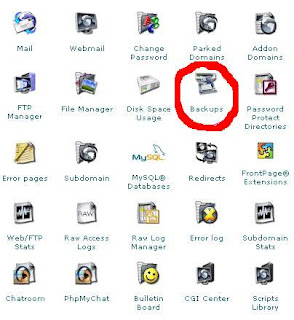
3. Choose a database from the list under:
Download a MySQL Database Backup
4. Save the file to you hard drive.
You are now done. I suggest doing a back up weekly or anytime you make a great deal of changes to your site. I highly suggest using Hostgator. They are very reliable and their customer support is fantastic.
1. Log in to your hosting account.
2. Locate your hosting site's "Backup" option.

3. Choose a database from the list under:
Download a MySQL Database Backup
4. Save the file to you hard drive.
You are now done. I suggest doing a back up weekly or anytime you make a great deal of changes to your site. I highly suggest using Hostgator. They are very reliable and their customer support is fantastic.
Subscribe to:
Posts (Atom)


